
Table Of Contents
Verizon
If you have been asking “Is Verizon down?” or staring at “SOS only” on your iPhone all day yesterday, you are far from alone.
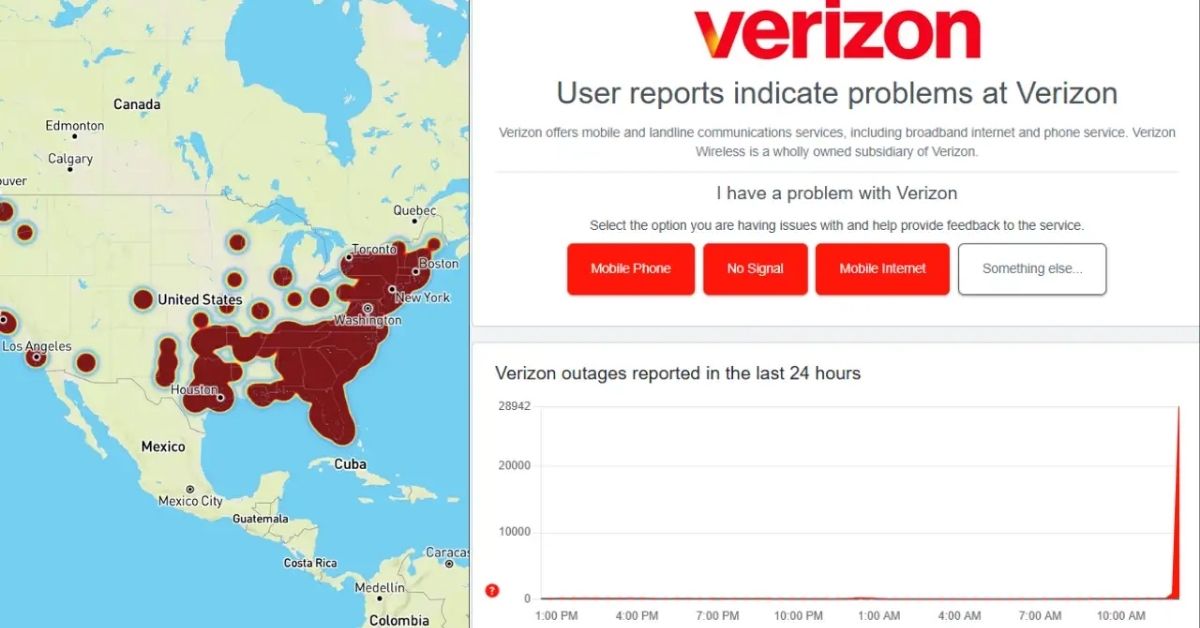
On January 14, 2026, Verizon Wireless experienced a nationwide network outage that affected millions of customers across the US.
Phones lost cellular service, data stopped working, and many devices switched to emergency SOS mode.
The good news?
As of late January 14 and into January 15, Verizon has confirmed the issue is resolved, and service is coming back for most users.
This was not just a small glitch; Downdetector logged over 1.5 million reports at its peak, making it one of the biggest cellular outages in recent years.
Customers from coast to coast reported problems, with spikes in major cities like New York City, Houston, Atlanta, Philadelphia, Dallas, Charlotte, and Los Angeles.
What Happened With Verizon Today (And Yesterday)?
The outage kicked off around midday Eastern Time on January 14, hitting voice calls, text messages, and mobile data hard.
Many Verizon customers saw their signal bars disappear completely, replaced by “No Service” or “SOS” on iPhones.
Android users often reported similar issues, with phones unable to connect to the network.
Verizon quickly acknowledged the problem, with its engineers working around the clock.
By late evening on the 14th, the company announced the outage was resolved.
They apologized for the inconvenience and promised account credits for affected customers.
Details will come directly to your account soon.
While Verizon has not shared the exact cause yet, reports point to a technical network issue rather than anything like a cyber attack.
These kinds of widespread disruptions can happen when there is a problem with core network equipment or when software updates go wrong.
Why Was My Phone Stuck In SOS Mode?
If your iPhone showed “SOS” or “SOS only” in the status bar, that is Apple’s emergency mode kicking in.
It means your phone could not connect to Verizon’s cellular network but could still make emergency calls (like 911) using any available signal, even from other carriers in some cases.
This is common during big outages because the device searches for any tower it can reach for emergencies.
On Android, you might have seen “Emergency calls only” or no signal at all.
It is frustrating, especially if you rely on your phone for work, family, or even buying concert tickets (yes, some folks missed out on Bruno Mars tickets because verification texts did not come through!).
Is Verizon Still Down In My Area?
As of January 15, most services have been restored nationwide.
If you are still seeing issues like “Verizon down in my area” or no bars, do not panic; lingering problems are normal after a big fix.
Verizon recommends a simple restart to reconnect.
To check Verizon outage status near you:
- Visit Verizon’s network status checker (search “check network status Verizon”).
- Look at Downdetector for real-time user reports.
- Some areas, like parts of New Jersey, Texas, and Florida, had higher report volumes, but things are clearing up fast.
How To Get Your Phone Out Of SOS Mode And Back To Normal
If your Verizon phone is still stuck in SOS mode or showing no service, try these steps in order.
They have helped thousands during this outage:
| Step | Action | Why It Helps |
|---|---|---|
| 1 | Restart your phone (hold the power button, slide to power off, wait 30 seconds, turn back on) | Clears temporary glitches and forces reconnection to the network |
| 2 | Toggle Airplane Mode on for 10-15 seconds, then off | Resets your cellular radio without a full restart |
| 3 | Check for carrier settings update (Settings > General > About on iPhone; it will prompt if available) | Verizon often pushes fixes during outages |
| 4 | Remove and reinsert your SIM card (or reset eSIM if applicable) | Refreshes your connection to Verizon towers |
| 5 | Reset network settings (Settings > General > Transfer or Reset iPhone > Reset > Reset Network Settings) | Clears any corrupted settings—note: you’ll need to rejoin Wi-Fi networks afterward |
| 6 | Contact Verizon support if nothing works | They can check for account-specific issues |
Most people found service returning after steps 1 or 2.
Avoid factory resets unless necessary; they erase everything!
Verizon Customer Service And What To Expect Next
Verizon has been busy handling calls, so wait times might be longer than usual.
You can reach Verizon Wireless customer service at *611 from your phone or 1-800-922-0204.
They are also monitoring social media for updates.
The company has committed to automatic credits for affected users; no need to call and ask, though you can if you want details.
Compared to past cell service outages (like the big one with another carrier a couple of years back), Verizon moved pretty quickly to resolve this.
Still, it is a reminder of how much we depend on reliable networks.
Final Thoughts
We are glad to report that the Verizon network outage is behind us, and normal service is resuming across the country.
If you have been wondering “When will Verizon be back up?” or “Why is my phone on SOS?”, hopefully this clears things up.
Stay patient if your area is taking longer; restarts usually do the trick.
Here at THOUSIF INCORPORATED, we keep an eye on these tech disruptions so you do not have to stress alone.
Check back for more updates on tech news, tips, and guides.
What is the biggest hassle this outage caused for you?
Drop a comment, we would love to hear!
Stay connected, everyone!
About Author